
Meta Ads Retargeting: Turn Window Shoppers Into Repeat Fashion Buyers
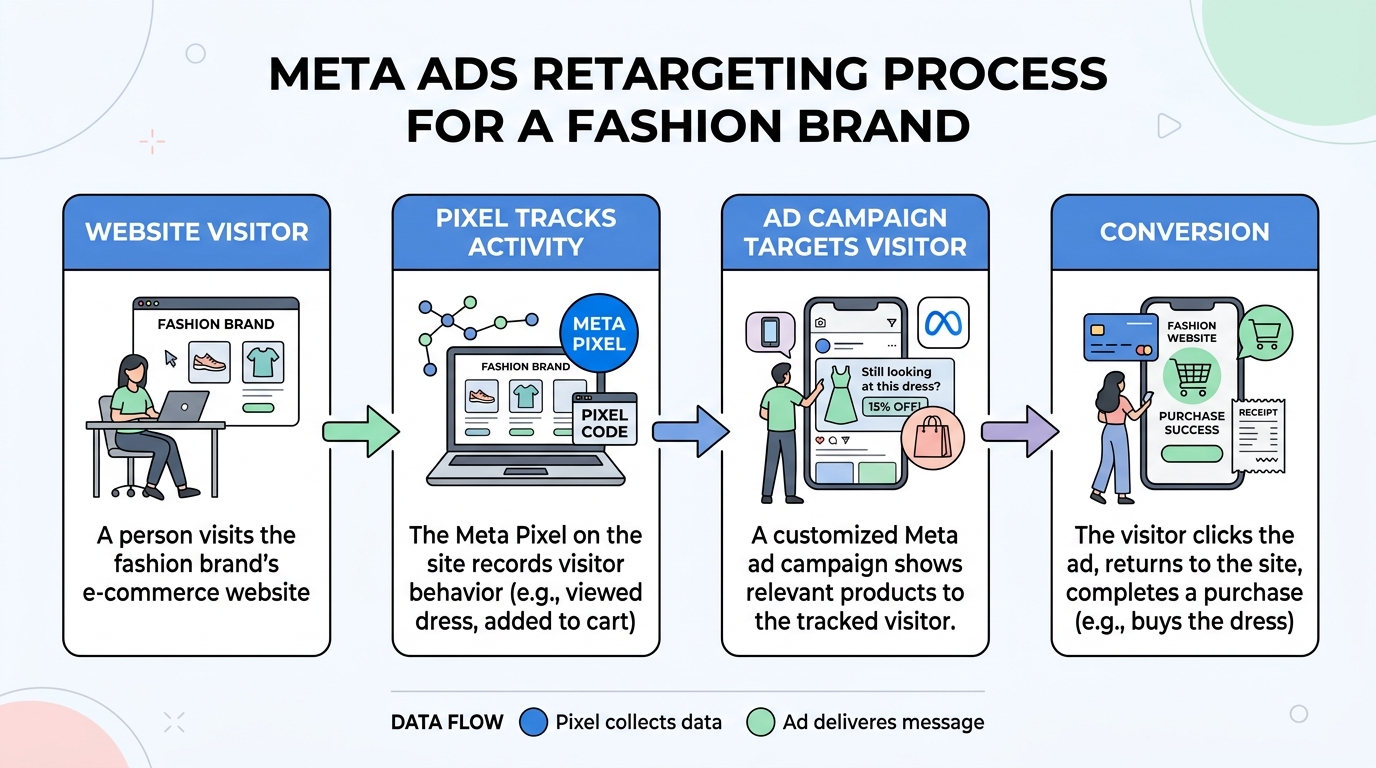
Meta Ads retargeting for fashion ecommerce involves creating targeted Facebook ad campaigns to re-engage users who have previously interacted with your brand. By using the Meta Ads Manager to track website visitors, you can serve personalized ads to potential customers, significantly improving your marketing strategy, conversion rates, and return on ad spend (ROAS) for garment marketing.
How to Set Up Your Meta Pixel for Retargeting
To set up your Meta Pixel, navigate to the Events Manager in Meta Ads Manager. Create a new data source, select "Web," and follow the on-screen instructions to either manually install the code on your fashion ecommerce site or use a partner integration like Shopify or WooCommerce. The Pixel is essential for tracking user actions and building retargeting audiences. The Meta Pixel is a snippet of code that you place on your website. It collects data that helps you track conversions from Meta ads, optimize ads, build targeted audiences for future ads, and retarget people who have already taken some kind of action on your website. For fashion ecommerce, tracking events like "ViewContent," "AddToCart," and "Purchase" is crucial.
- Access Events Manager: Go to your Meta Ads Manager and find the "Events Manager" section.
- Create a Pixel: Click on "Connect Data Sources" and select "Web." Then, select "Meta Pixel" and connect.
- Name Your Pixel: Give your Pixel a name that represents your business.
- Install the Pixel Code: You have three options: add code using a partner integration, manually add the code to your website, or email instructions to a developer. Using a partner integration is often the easiest method for platforms like Shopify, BigCommerce, or Magento.
- Verify Pixel Activity: Once installed, you can use the Meta Pixel Helper Chrome extension to ensure it's firing correctly on your product pages, cart, and checkout.
How to Create Custom Audiences for Fashion Shoppers
Create Custom Audiences in Meta Ads Manager by navigating to the "Audiences" section. Use your website traffic as the source and define audiences based on specific actions, such as visitors who viewed a certain product category (e.g., "dresses") or added an item to their cart but did not complete the purchase within the last 30 days.
Your retargeting campaigns are only as good as the audiences you build. For a fashion brand, segmenting your audience allows for highly personalized and effective advertising. Here are some high-value custom audiences to create:
Audience SegmentDescriptionRetargeting AngleAll Website VisitorsAnyone who has visited your site in the last 30-90 days.General brand reminder, showcase new arrivals.Product Page ViewersUsers who viewed specific product pages but didn't add to cart.Show them the exact garment they viewed, perhaps with a small discount.Add to Cart (No Purchase)Users who added items to their cart but abandoned the checkout process.Remind them of the items in their cart, create a sense of urgency.Past PurchasersCustomers who have bought from you before.Upsell or cross-sell complementary items, announce new collections.
How to Launch Your First Retargeting Campaign
To launch a campaign, go to the Meta Ads Manager, click "Create," and choose the "Sales" objective. Select your previously created "Add to Cart" custom audience in the ad set settings. For the ad creative, use Dynamic Product Ads to automatically show people the products they are most interested in, maximizing relevance and ROAS. With your Pixel installed and audiences created, you're ready to launch. A dynamic retargeting campaign is a powerful tool for fashion ecommerce, as it automatically shows individual products to people who have viewed them on your website. Setting up the campaign involves selecting the right objective, budget, and ad format. The "Sales" objective is typically best for retargeting, as your goal is to drive conversions. Your marketing strategy should focus on re-engaging warm leads to convert them into loyal customers.
Frequently asked questions
How long before how to use meta ads retargeting to boost fashion sales campaigns stabilize?
Most fashion accounts need 50+ weekly purchase events before Meta exits the learning phase. Plan two to three weeks of stable spend before judging ROAS.
What budget should a fashion brand start with for Meta ads?
Start with enough daily budget to generate 7–10 purchases per ad set per week. For many apparel brands that means $100–$300 per day on prospecting.
When should you refresh creative for fashion Meta ads?
Refresh hooks or swap in new video variants when frequency exceeds 2.5 or CPA rises 20% week over week. Weekly creative tests are standard for scaling brands.
How long before how to use meta ads retargeting to boost fashion sales campaigns stabilize on Meta?
Most fashion accounts need 50+ weekly purchase events before Meta exits the learning phase. Plan two to three weeks of stable spend before judging ROAS.